QR code menu
A QR code menu on every table, that guests can order from.
Dyne gives each table its own QR code. A guest scans it, your menu opens on their phone, and when they order, the ticket reaches your kitchen with the table number on it.
What is a QR code menu?
A QR code menu is a menu guests reach by pointing their phone camera at a QR code on the table. The code holds a web link, and the phone opens the menu in its browser. It's the most common way to put a digital menu in front of guests, because there's nothing to download and nothing to explain.
What the code opens is what matters. Many QR menus open a PDF of the printed menu. Dyne's opens a menu built for phones that guests can also order from.
One code per table
In Dyne you add your tables and each one gets its own code, ready to print. That one detail does most of the work:
- The kitchen knows where the food goes. The table number travels with every order.
- The codes never go stale. Each code is a short, stable link to its table. Edit your menu as often as you like and the printed codes keep working.
- Service requests come from the right place. When a guest taps Call waiter or Bill, your staff see which table asked.
What guests see after scanning
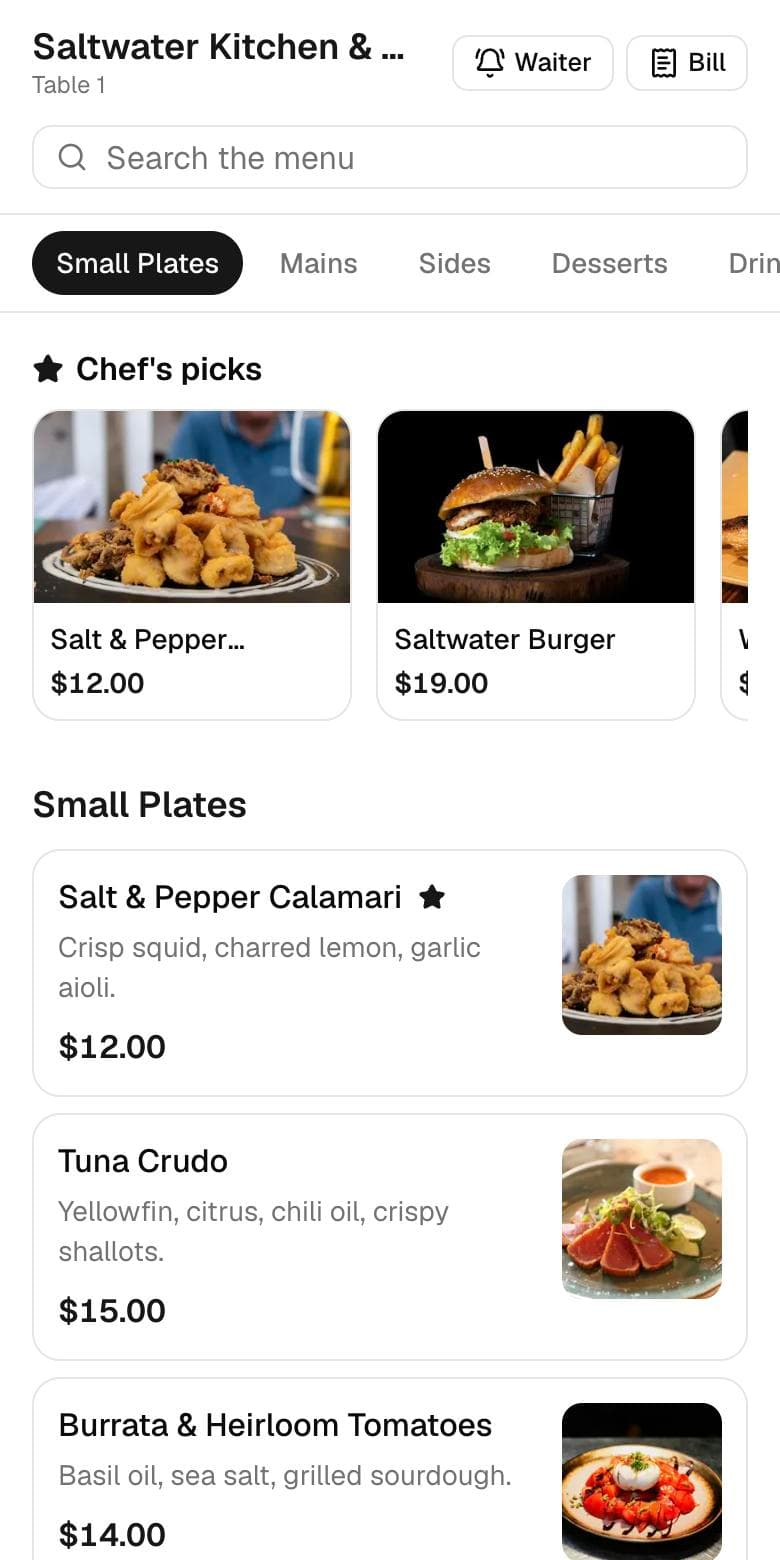
Your logo and colors, your categories and dishes, prices in your currency, and photos if you add them. Sold-out items are already hidden. Guests pick sizes and add-ons, review their cart and send the order, then watch it move from Received to Preparing, Ready and Served.
Putting the codes on the tables
- Table tents or stickers. Anything that stays upright and clean works. Print the codes from Dyne and put one on each table.
- Test from a seat. Before service, scan every code from where a guest would sit, in your usual lighting.
- Add one line of text like “Scan to see the menu and order”. Guests are more likely to scan when they know what they'll get.
- Brief your staff. They still take orders by hand for anyone who prefers it. The QR code adds a way to order and doesn't replace them.
The full walkthrough is in how to create a digital menu.
QR code menu vs a QR code to a PDF
| QR code → PDF | Dyne QR code menu | |
|---|---|---|
| Reads well on a phone | Pinch and zoom | Built for phones |
| Shows what's sold out | No | Yes, instantly |
| Guests can order | No | Yes, to the kitchen screen |
| Price change | Re-export and re-upload | Edit, and it's live |
| Knows the table | No | Yes |
More on the trade-offs in PDF menu vs digital menu.
Questions
Do guests need a QR code app?
Usually not. Most phones scan QR codes straight from the camera app. The menu then opens in the browser, with no app to install.
Do I need to reprint the QR codes when my menu changes?
No. Each table's code points to that table, not to a particular version of your menu. Change dishes and prices as often as you like and the printed codes keep working.
How does the kitchen know which table ordered?
Every table has its own code, so the table number is attached to the order automatically and shows on the kitchen ticket.
Can I make a QR code menu from my PDF?
You can, with any free QR generator, but guests then pinch and zoom through a document that can't show what's sold out or take an order. Dyne builds the menu for phones instead, and can still print an A4 copy for you.
How much does a QR code menu cost with Dyne?
$10 a month or $100 a year for all your tables, with a 14-day free trial and no card needed.
Put a digital menu on your tables this week.
$10 a month, 14 days free, no card needed. Prefer we set it up? Send us your menu by email or WhatsApp.
Start your free trial