How to create a digital menu
How to create a digital menu for your restaurant
Eight steps, from a list of dishes to guests ordering from their phones. The steps work with any tool. Where it helps, we show how they go in Dyne.
Updated
In short
- Gather your items, prices, sizes and add-ons.
- Decide what kind of digital menu you need.
- Build the menu, category by category.
- Add your logo and colors.
- Create your tables and print a QR code for each one.
- Set up the kitchen screen.
- Do a test run with your staff.
- Put the codes out, and keep the menu current.
1. Gather your menu
Start from your current menu and write down, for every dish and drink: the name, the price, a one-line description and which category it belongs to. Then list the choices guests make: sizes (regular or large), add-ons (extra egg), and options (spice level). These choices are what reach the kitchen, so it pays to get them right.
Photos are optional. A menu with good descriptions and no photos beats one with dark, blurry photos.
2. Decide what kind of digital menu you need
- A PDF behind a QR code: free and quick, but hard to read on a phone and fixed until you upload a new file.
- A view-only digital menu: built for phones and easy to edit, but guests still wait for someone to take their order.
- A digital menu with ordering: guests order from the menu and the order goes to the kitchen. This is what Dyne does.
If your team is stretched at peak times, or your seating is spread out (a terrace, a pool, a beach), ordering is where the time is saved. The trade-offs are laid out in PDF menu vs digital menu.
3. Build the menu
Enter your categories first, in the order guests should see them, then the items in each. In Dyne, sign up with your email and add items from the menu manager. Sizes and add-ons are option groups you attach to an item. Prices show in your restaurant's currency.
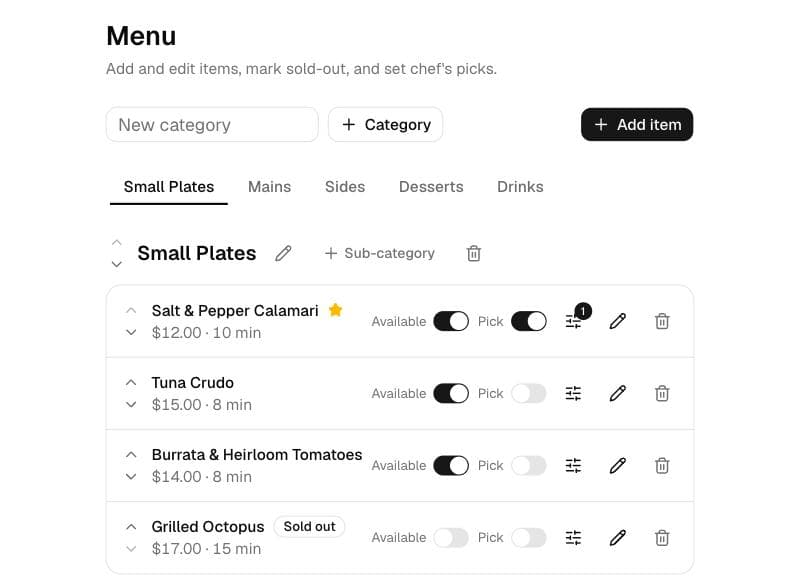
Would rather not type it all in? Send us your menu and we'll set it up for you. It's included in the price.
4. Make it look like your restaurant
Upload your logo and pick an accent color. Guests should feel they're on your menu, not a software company's. In Dyne the whole menu follows the color you choose.
5. Create your tables and print the QR codes
Add each table, using the names your staff already use (“T4”, “Terrace 2”). Dyne creates a QR code for every table and prints it for you. Because each code belongs to one table, orders arrive with the table attached, and the codes keep working however often you change the menu.
Put the codes in table tents or on stickers, with a short line like “Scan to see the menu and order”. Scan each one from a guest's seat before you open. More on this in QR code menus.
6. Set up the kitchen screen
Open the kitchen screen in the browser of a tablet, laptop or phone at the pass, on your most reliable connection. New orders arrive with a sound and a push alert. Your team taps each ticket along (Preparing, Ready, Served) and the guest's phone updates every time.
7. Do a test run
Before the first service, have your staff sit at a few tables and order from their own phones. Check that tickets reach the kitchen, that options come through correctly, and that Call waiter and Bill requests are noticed. Fix descriptions that cause questions.
8. Go live, and keep it current
Put the codes out and tell your staff to mention them. Guests who prefer it can still order with a person. After that, the menu is only as good as it is accurate: mark items sold out the moment they run out, and update prices the day they change. Print a few A4 copies from the same menu for guests who want paper.
Ready to try it? Dyne is $10 a month with a 14-day free trial, and you don't need a card to start. See how Dyne's digital menu works.
Questions
How long does it take to create a digital menu?
With your items and prices to hand, building the menu usually takes an afternoon. Photos take longer, so it's fine to launch without them and add them later.
Can I create a digital menu for free?
You can turn a PDF into a QR code with a free generator. It costs nothing, but guests can't order from it and it can't show what's sold out. A hosted digital menu like Dyne costs $10 a month after a free trial.
Do I still need a printed menu?
Keep a few. Some guests have no data or simply prefer paper. Dyne prints an A4 menu from the same data, so both versions always match.
Put a digital menu on your tables this week.
$10 a month, 14 days free, no card needed. Prefer we set it up? Send us your menu by email or WhatsApp.
Start your free trial