Digital menu
A digital menu for restaurants that takes the order, too.
Guests scan the QR code on their table, browse your menu on their own phone and send their order. It lands on your kitchen screen with the table number on it. You keep your menu up to date yourself, in minutes.
What is a digital menu?
A digital menu is a restaurant menu that guests open on their own phone instead of reading a printed card. Usually they scan a QR code on the table and the menu opens in their browser. Unlike a PDF of your paper menu, a proper digital menu is built for a phone screen. You can change it at any time, and it can show what's sold out right now.
Some digital menus stop there: guests read them, then wave someone over to order. Dyne's also takes the order, so guests can order straight from the menu.
How Dyne's digital menu works
- Scan. Each table has its own QR code. The guest scans it and your menu opens in their phone's browser. No app, no sign-up.
- Order. They choose sizes and add-ons, check their cart and send it. The table number travels with the order.
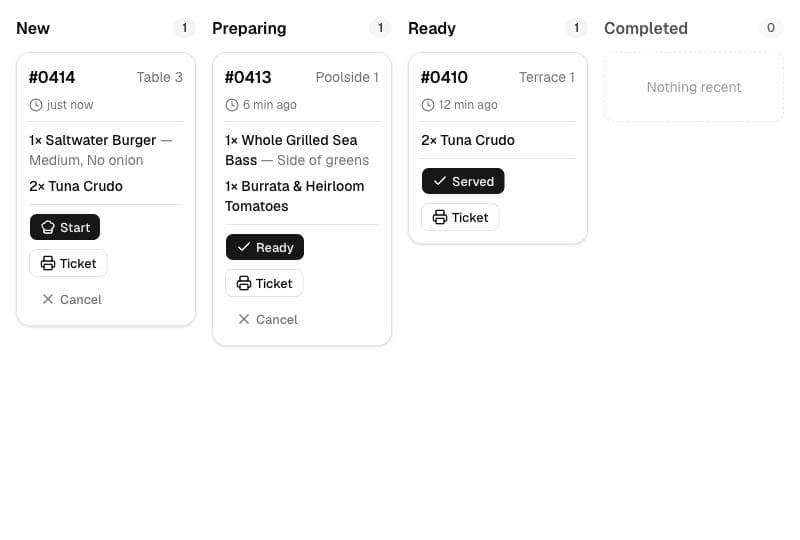
- Cook. The ticket appears on your kitchen screen with a sound and a push alert, showing every option the guest picked.
- Follow along. As your kitchen moves the ticket, the guest's phone updates: Received, Preparing, Ready, Served. They can also tap to call a waiter or ask for the bill.
What you can change, and how fast
- Sold out: one switch, and the item is gone from every table immediately.
- Prices and items: edit names, descriptions, prices and categories whenever you like. Prices show in your own currency.
- Sizes and add-ons: small/large, extra cheese, no onions. They reach the kitchen exactly as the guest chose them.
- Photos: optional, and you can add them later.
- Your brand: your logo and an accent color across the whole menu. Guests see your venue, not ours.
A digital menu, not a digital menu board
“Digital menu” also gets used for digital menu boards, the TV screens above a café counter. Dyne isn't one of those. It puts the menu on each guest's phone at the table, which is what sit-down restaurants, bars, beach clubs and resorts need: guests order from where they are, without queuing or catching a server's eye.
What you need to start
- Your menu: items and prices. Logo, colors and photos are optional.
- A device for the kitchen screen. It runs in a web browser, so a tablet, laptop or phone you already have will do.
- A printer for the table QR codes, which Dyne generates for you.
No hardware to buy, nothing for guests to install and no changes to your POS. Most restaurants have their menu in within an afternoon, or we can set it up for you. Step by step: how to create a digital menu.
Keep a paper menu too
Some guests want something to hold. Dyne prints your whole menu on A4 from the same data guests see on their phones, with your name, logo and every price, so the paper and digital menus never disagree. Comparing the options? Read PDF menu vs digital menu.
Pricing
One plan: $10 a month, or $100 a year. It includes QR codes for every table, the kitchen screen, staff logins, waiter and bill requests, and the printable menu. Start with a 14-day free trial with no card needed. No contract, cancel anytime.
Questions
Do guests need to download an app?
No. The menu opens in the phone's browser after they scan the table's QR code. There's no app and no account to create.
Can I change prices or take a dish off the menu?
Yes, any time, from your phone or computer. Mark an item sold out and it disappears from every table straight away. Price changes go live the same way, with nothing to reprint.
Do guests pay through the digital menu?
No. Dyne takes the order, not the payment. Guests pay at your cashier the way they do now, so your POS and cash handling stay the same.
What about guests without a smartphone or mobile data?
Your staff take their order as usual. Dyne can also print your menu on A4 from the same data, so the paper copy always matches the digital one.
Is a digital menu the same as a digital menu board?
No. A digital menu board is a TV screen above a counter. A digital menu in Dyne's sense is the menu on each guest's own phone, which they can also order from.
How much does it cost?
$10 a month or $100 a year, with a 14-day free trial and no card needed. Setup help is included.
Put a digital menu on your tables this week.
$10 a month, 14 days free, no card needed. Prefer we set it up? Send us your menu by email or WhatsApp.
Start your free trial